



Beautiful service. Brilliant business.
Billing, appointments, customers and your salon floor, together in one calm, elegant workspace. Made for Indian salons, spas and beauty studios.
The everyday salon headaches, sorted.
Clients waiting at reception while the bill is written
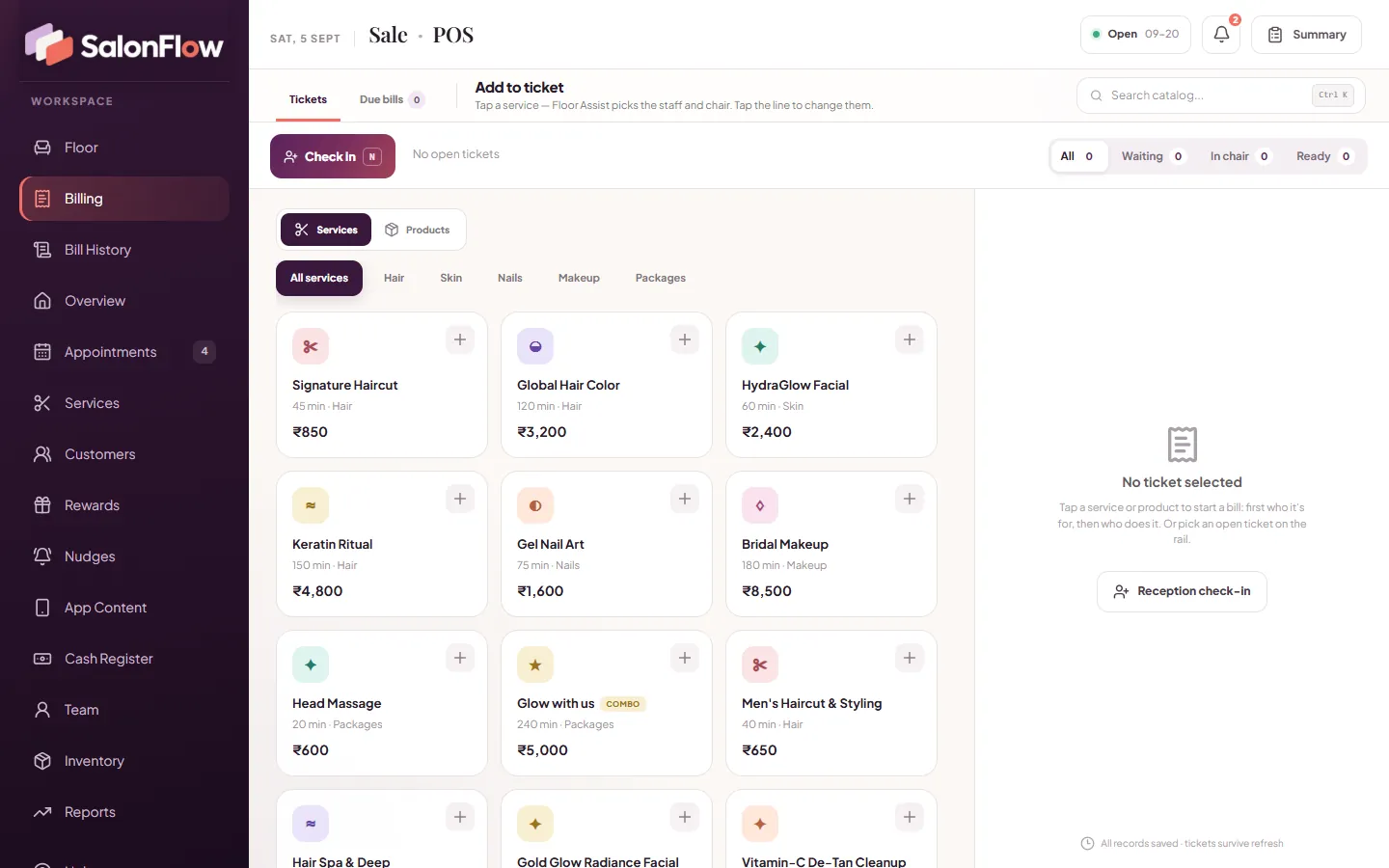
Tap a service, pick the stylist and chair, and take Cash, UPI, split or due in one popup
No idea who is in which chair or how long clients have waited
A live floor with chair tiles, wait times and Floor Assist to suggest a stylist and chair
Stylists miss a new client because they did not see the message
The Staff app keeps ringing until the stylist taps Accept, even when the app is closed
Arguments over commission and salary every month
Stylist credit on every bill line, commission splits and a salary ledger staff confirm in their app
Deleted bills, unpaid dues and a cash drawer that never tallies
A due-bills ledger, a permanent log of deleted bills and a day-end cash count that shows over or short
Clients visit once and never come back
Reward points, Silver, Gold and Diamond tiers, coupons and WhatsApp offers give them a reason to return
From the first client to the final cash count
Your reception, your salon floor and your back office, all working from the same records.
POS billing
Tap a service or product, choose the client or a walk-in, then assign the stylist and chair. Hold tickets, filter by Waiting, In chair and Ready, and use keyboard shortcuts at the desk.
Live floor & Floor Assist
Chair tiles with progress, a waiting list with live wait times and a Ready-to-pay panel. Floor Assist suggests a chair and stylist by client preference, skills and fair turns, and respects staff breaks.
GST invoices & printing
GST of 0, 5, 12, 18 or 28% or a custom rate per item, tax invoices with CGST and SGST, and 80 mm, 58 mm or A4 printing. Not GST-registered? One switch hides it all.
Payments, dues & cash register
Cash, UPI, split and due payments, with change worked out for you. Keep a due-bills ledger, log expenses by category, and count the notes at closing to see if the drawer is over or short.
Appointments & online booking
Desk bookings and app bookings land in one list, each with the client's preferred stylist. When the client arrives, check them in from the booking and their services are already on the ticket.
Customers, loyalty & packages
Client profiles with Excel export, reward points (1 point = ₹1 off) with Silver, Gold and Diamond tiers, coupon codes and combo packages. Points can reset monthly, every 6 months, yearly or never.
Team, commission & payroll
Commission per stylist, splits for shared services, absent-day deductions and advances. Payroll exports to Excel, and staff confirm their salary in their own app.
Inventory & bill scanning
Enter purchase bills with free quantity, discount, GST and margin, or scan a photo of a printed bill to save typing. Track supplier dues and low stock.
Reports & Excel exports
See today, this week, this month, this year or any date range, with growth against the previous period and your average bill. Export sales, payment split, staff and GST reports to Excel.
A closer look at SalonFlow
Your salon's own booking app
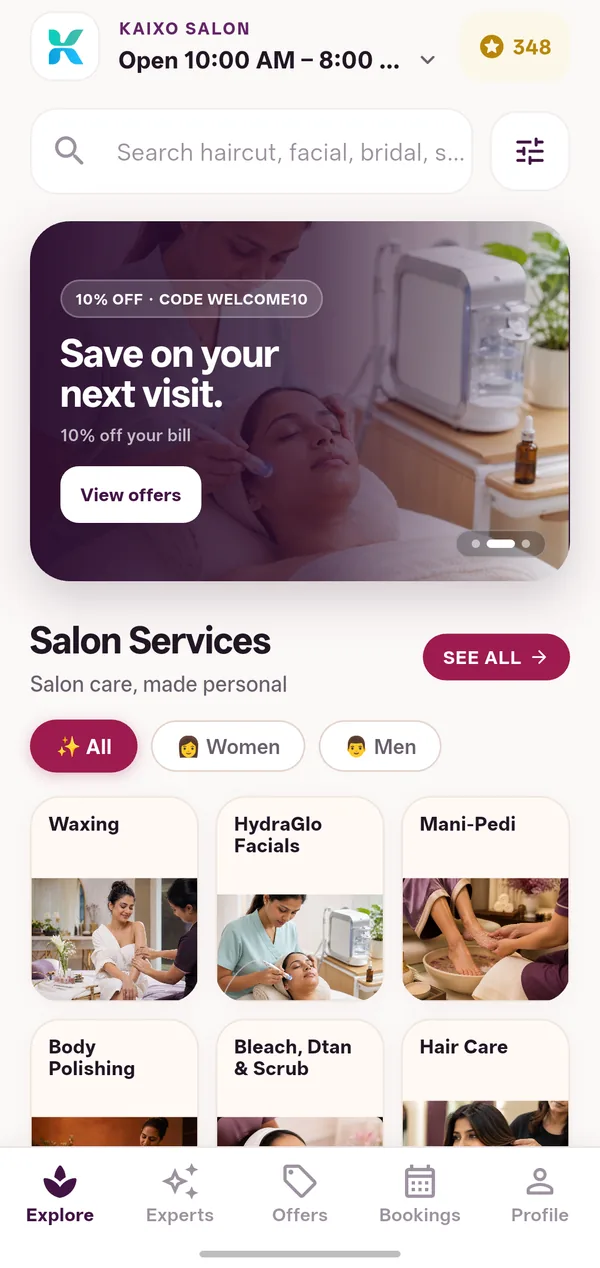
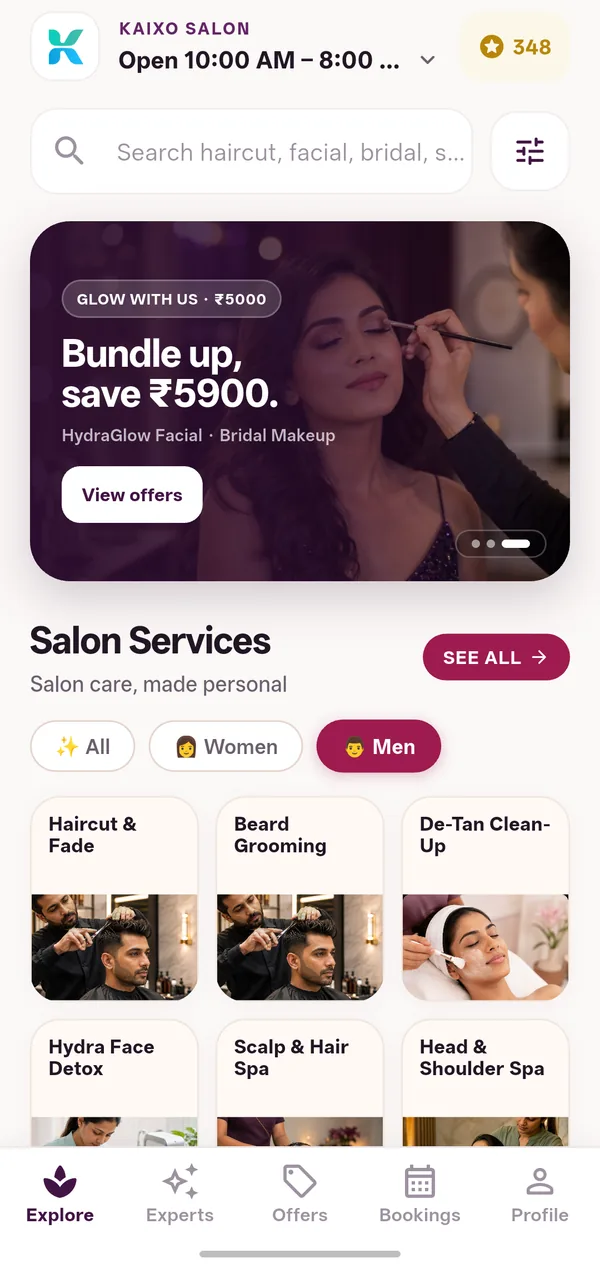
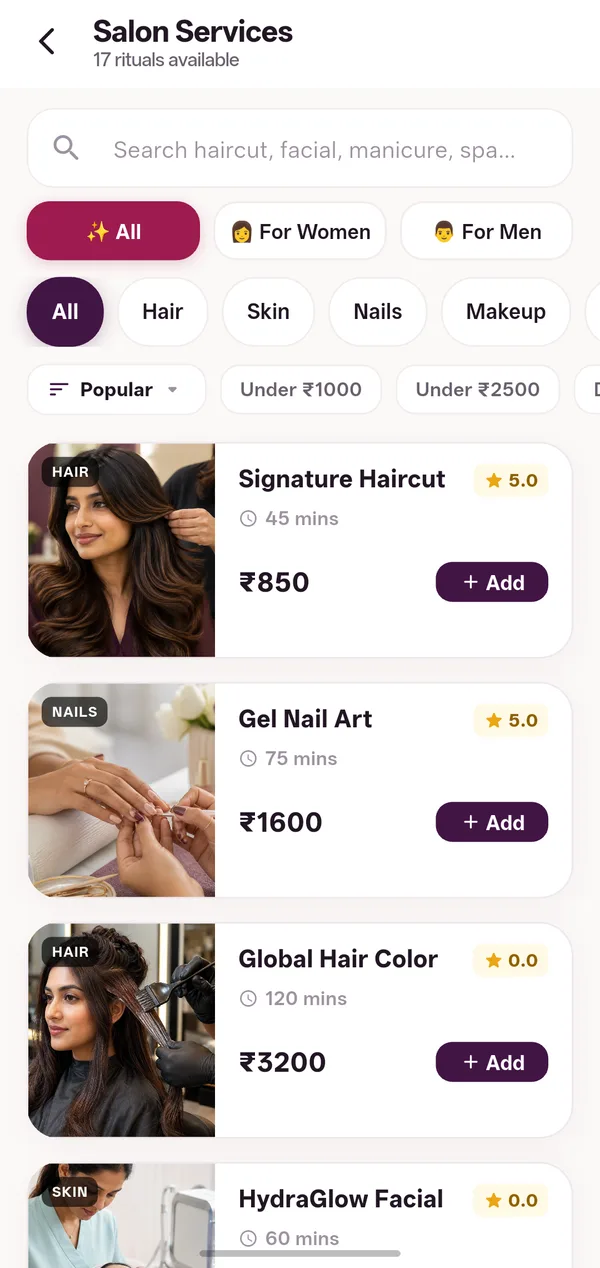
Give your clients an app that carries your salon's own name, logo and photos. They browse services for women or men, see open slots, use offers and book in a few taps, any time of day.
- Service catalog with photos, prices and Women, Men and category filters
- Offers, coupons, packages and each client's points balance
- Only genuine ratings from completed visits, with a “Share on Google” link for happy clients
- Change banners, service photos and client stories from your web workspace
- Client Nudges: one seasonal reminder card a day for each client, such as monsoon frizz care or a festive glow
These screens show a demo salon. Your clients will see your brand instead.
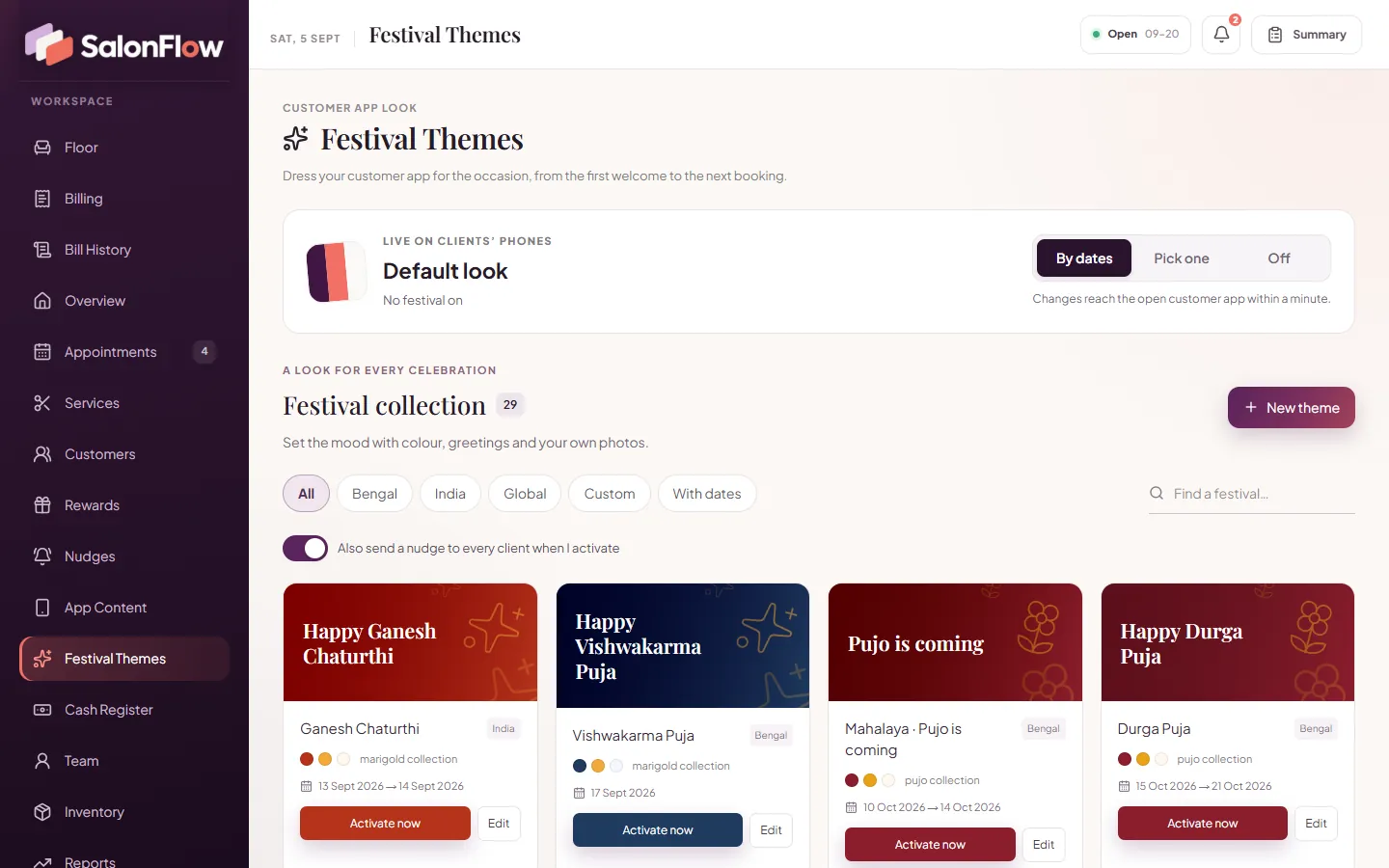
A festive look for every season
Your clients open the app to a welcome screen dressed for the festival, with your greeting and a festival offer. Plan it all from your web workspace: let themes switch on by date, pick one yourself or turn them off, and see a live phone preview as you edit.
- About 30 ready-made looks, including the everyday default
- Poila Boishakh, Jamai Sasthi, Durga Puja and Bhai Phonta, plus Diwali, Christmas and New Year
- Edit the greeting, colours, coupon and photo, with a contrast check for easy reading
- Send festival greetings and offers to clients on WhatsApp

Bookings from the desk and the app, in one list
Take bookings at reception or let clients book from your app. See the coming days at a glance, so you always know who is expected and which stylist they asked for.
- Live slots based on the stylists who are in that day
- A booking code for every app booking
- Cancel reasons, so you know why a slot opened up
One salon, every screen
The counter, the owner's phone, your stylists' phones and your clients' app all share one salon workspace.
Web workspace
The full POS and management console in the browser on your counter PC or laptop, with 80 mm, 58 mm or A4 printing.
SalonFlow Admin app
An Android app for the owner with the floor, billing, payroll, reports and settings, bill scanning by camera and biometric unlock.
SalonFlow Staff app
An Android app for stylists. An assignment alarm rings until they accept, plus GPS check-in and check-out, breaks, sales targets and salary details.
Customer booking app
Your salon's own branded Android app, where clients book, collect points and use your offers.
Made for every kind of beauty business
SalonFlow questions, answered
Will the booking app show my salon's name?
Yes. The app shows your salon's name, logo and photos, and you manage its banners and service photos from the web workspace. Clients sign in with their phone number and a one-time code sent on WhatsApp or given at the counter.
Can SalonFlow send bills and offers on WhatsApp?
Yes. The bill can go to the client on WhatsApp right after checkout. You can also send festival greetings, and offers with a coupon to everyone, to one tier, or only to men or women. Messages go out automatically through the WhatsApp Cloud API, and each one is logged. If automatic sending is not connected yet, each WhatsApp button opens a normal WhatsApp chat instead.
My salon is not GST-registered. Can I still use it?
Yes. One switch turns GST off and hides it everywhere. If you register for GST later, switch it back on, set a rate for each service or product and print proper tax invoices with the CGST and SGST split.
Can I control what my staff can see?
Yes. There are four roles: Admin for the owner, Manager, Cashier and Staff. Managers see everything except settings and festival themes. Cashiers handle billing, the floor, the cash register and the catalog, while stylists see only the floor and appointments. Trusted devices can be locked with a PIN, and the Admin app supports biometric unlock.
What do I need to get started?
A PC or laptop with a web browser for the counter, and Android phones for the Admin and Staff apps. For printed bills, use an 80 mm or 58 mm thermal printer or a regular A4 printer.
See SalonFlow with your own services.
Tell us about your salon and we will show you exactly how SalonFlow fits your reception, your floor and your team.
More from Navriddhi
 BhojoneRestaurant POS & management
 ViniFlowBar, restaurant & FL shop billing
 WABizHubWhatsApp marketing & inbox
 SwarnaPOSGold & jewellery shop billing
 WearzoClothing, footwear & watch shop billing
 GymPilotGym & fitness centre software
 PharmzoPharmacy billing software
 HealDeskHospital management software
 TripzoTravel & tour business software
 SchoolSchool management software
 HisabERP, stock management, POS & invoicing